
IDQ Monitor User

IDQ Monitor User

Lo stato dei tuoi computer in tempo reale, ogni core, ogni disco, ogni servizio. Se qualcosa non va, ti avvisa sul telefono.The status of your computers in real time: every core, every disk, every service. If something is wrong, it alerts you on your phone.L'état de vos ordinateurs en temps réel : chaque cœur, chaque disque, chaque service. En cas de problème, il vous alerte sur votre téléphone.Der Zustand deiner Computer in Echtzeit: jeder Kern, jeder Datenträger, jeder Dienst. Wenn etwas nicht stimmt, warnt es dich auf dem Handy.El estado de tus ordenadores en tiempo real: cada núcleo, cada disco, cada servicio. Si algo va mal, te avisa en el móvil.

Prova gratuita di 24 oreFree 24-hour trialEssai gratuit de 24 heuresKostenloser 24-Stunden-TestPrueba gratuita de 24 horasAlla prima apertura puoi provare l'app per 24 ore sul server IDQ, con un PC dimostrativo e, se vuoi, anche i tuoi PC. La prova si fa una sola volta per dispositivo; poi serve il tuo server.On first launch you can try the app for 24 hours on the IDQ server, with a demo PC and, if you like, your own PCs too. The trial can be done only once per device; after that you need your own server.Au premier lancement, vous pouvez essayer l'application pendant 24 heures sur le serveur IDQ, avec un PC de démonstration et, si vous le souhaitez, vos propres PC. L'essai ne se fait qu'une fois par appareil ; ensuite il faut votre propre serveur.Beim ersten Start kannst du die App 24 Stunden lang auf dem IDQ-Server testen, mit einem Demo-PC und auf Wunsch auch mit deinen eigenen PCs. Der Test ist nur einmal pro Gerät möglich; danach brauchst du deinen eigenen Server.En el primer inicio puedes probar la app durante 24 horas en el servidor IDQ, con un PC de demostración y, si quieres, también con tus propios PC. La prueba se hace una sola vez por dispositivo; después necesitas tu propio servidor.

Cosa faWhat it doesCe qu'il faitWas es kannQué hace

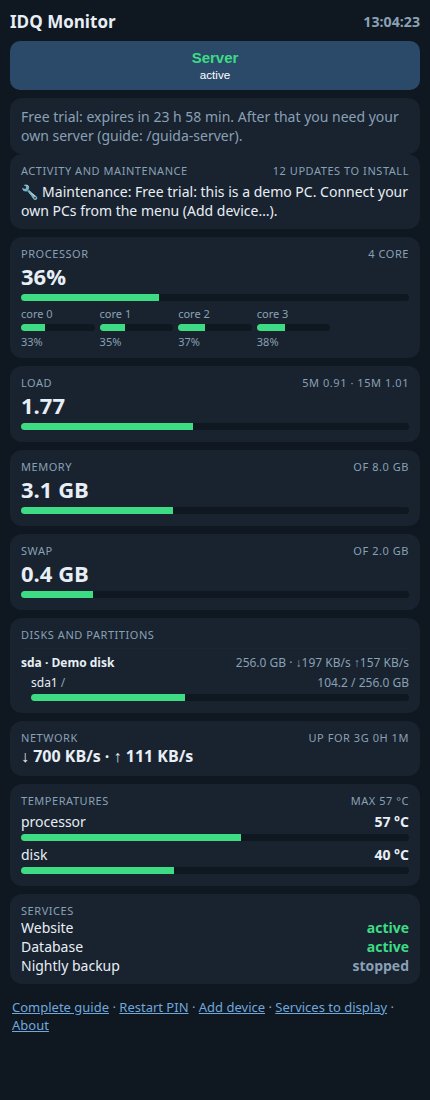
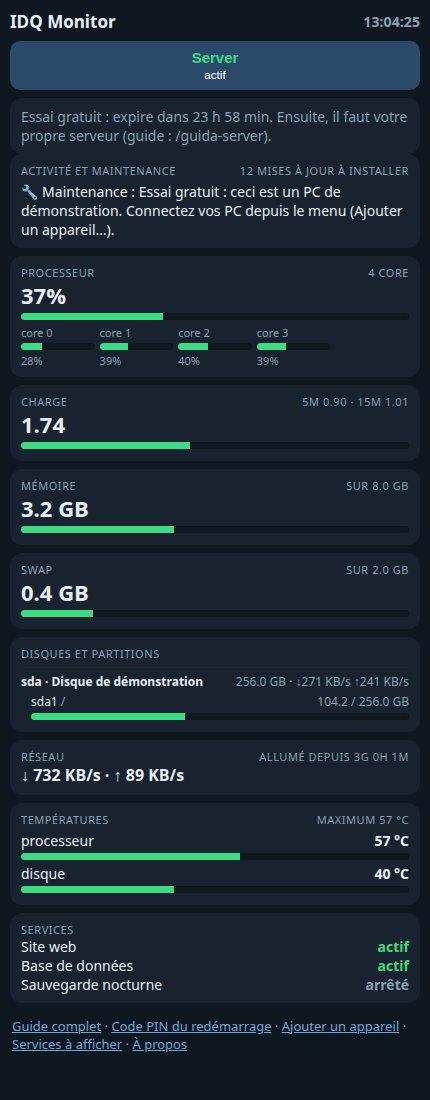
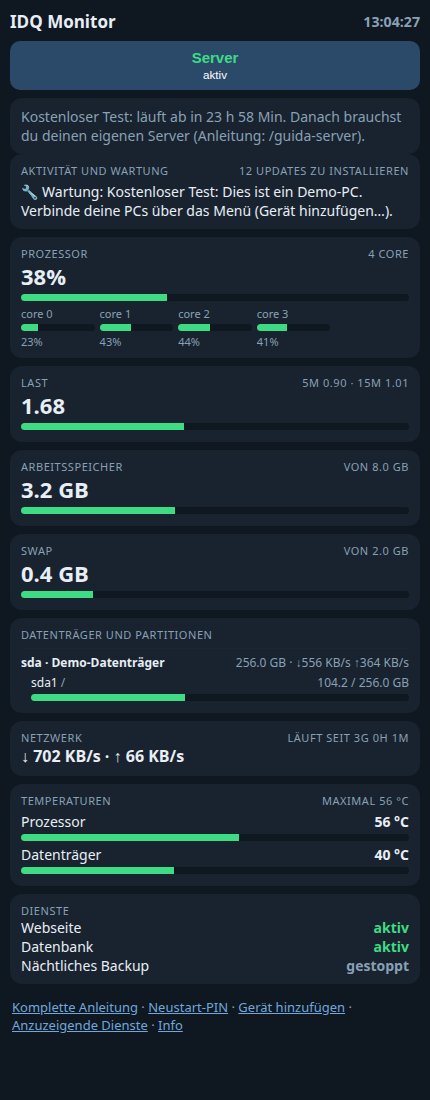
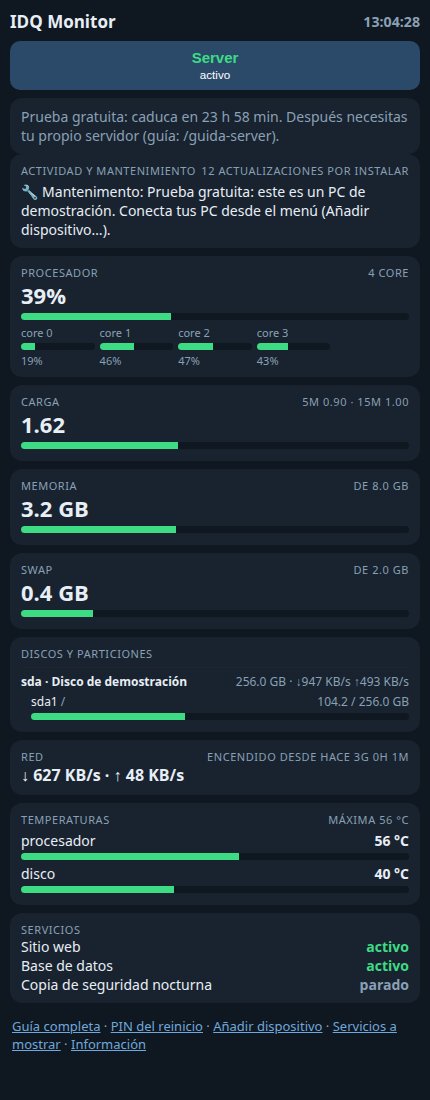
Tutto in una paginaEverything on one pageTout sur une pageAlles auf einer SeiteTodo en una páginaProcessore con ogni core, memoria, swap, scheda video dedicata, dischi con le partizioni, rete, consumo in watt (intero PC, processore e GPU), temperature e servizi: le voci si adattano al tuo schermo.Processor with every core, memory, swap, dedicated graphics card, disks with partitions, network, power consumption in watts (whole PC, processor and GPU), temperatures and services: items adapt to your screen.Processeur avec chaque cœur, mémoire, swap, carte graphique dédiée, disques avec partitions, réseau, consommation en watts (PC entier, processeur et GPU), températures et services : les éléments s'adaptent à votre écran.Prozessor mit jedem Kern, Speicher, Swap, dedizierte Grafikkarte, Datenträger mit Partitionen, Netzwerk, Verbrauch in Watt (ganzer PC, Prozessor und GPU), Temperaturen und Dienste: Die Elemente passen sich deinem Bildschirm an.Procesador con cada núcleo, memoria, swap, tarjeta gráfica dedicada, discos con particiones, red, consumo en vatios (todo el PC, procesador y GPU), temperaturas y servicios: los elementos se adaptan a tu pantalla.
Avvisi intelligentiSmart alertsAlertes intelligentesIntelligente WarnungenAvisos inteligentesScegli quali allarmi ricevere e le soglie. Uno spegnimento normale non ti disturba; un arresto improvviso sì.Choose which alarms to receive and their thresholds. A normal shutdown doesn't bother you; a sudden stop does.Choisissez les alarmes à recevoir et leurs seuils. Un arrêt normal ne vous dérange pas ; un arrêt brutal, si.Wähle, welche Alarme du erhältst, und ihre Schwellenwerte. Ein normales Herunterfahren stört dich nicht, ein plötzlicher Ausfall schon.Elige qué alarmas recibir y sus umbrales. Un apagado normal no te molesta; una parada repentina, sí.
Tutti i tuoi computerAll your computersTous vos ordinateursAlle deine ComputerTodos tus ordenadoresLinux, Raspberry Pi e Windows. Aggiungi un dispositivo con un solo comando generato dall'app.Linux, Raspberry Pi and Windows. Add a device with a single command generated by the app.Linux, Raspberry Pi et Windows. Ajoutez un appareil avec une seule commande générée par l'application.Linux, Raspberry Pi und Windows. Füge ein Gerät mit einem einzigen, von der App erzeugten Befehl hinzu.Linux, Raspberry Pi y Windows. Añade un dispositivo con un solo comando generado por la app.
Servizi sotto controlloServices under controlServices sous contrôleDienste im GriffServicios bajo controlL'app rileva i servizi di ogni computer e scegli quali mostrare. Distingue un servizio fermo da uno andato in errore.The app detects the services on every computer and you choose which to show. It tells a stopped service from one that failed.L'application détecte les services de chaque ordinateur et vous choisissez lesquels afficher. Elle distingue un service arrêté d'un service en échec.Die App erkennt die Dienste jedes Computers, und du wählst, welche angezeigt werden. Sie unterscheidet einen gestoppten von einem abgestürzten Dienst.La app detecta los servicios de cada ordenador y eliges cuáles mostrar. Distingue un servicio parado de uno que ha fallado.
Aggiornamenti e riavviiUpdates and restartsMises à jour et redémarragesUpdates und NeustartsActualizaciones y reiniciosVedi quando serve un riavvio e, se vuoi, riavvia il computer dall'app, protetto da un PIN scelto da te.See when a restart is needed and, if you like, restart the computer from the app, protected by a PIN of your choice.Voyez quand un redémarrage est nécessaire et, si vous le souhaitez, redémarrez l'ordinateur depuis l'application, protégé par un code PIN de votre choix.Sieh, wann ein Neustart nötig ist, und starte den Computer bei Bedarf über die App neu – geschützt durch eine PIN deiner Wahl.Mira cuándo hace falta reiniciar y, si quieres, reinicia el ordenador desde la app, protegido por un PIN que elijas.
I tuoi dati restano tuoiYour data stays yoursVos données restent à vousDeine Daten bleiben deineTus datos siguen siendo tuyosNiente account, niente pubblicità, niente analisi. I dati vanno solo al server che scegli tu.No accounts, no ads, no analytics. Data only goes to the server you choose.Pas de compte, pas de publicité, pas d'analyse. Les données vont uniquement au serveur que vous choisissez.Keine Konten, keine Werbung, keine Analyse. Die Daten gehen nur an den Server, den du wählst.Sin cuentas, sin publicidad, sin análisis. Los datos solo van al servidor que elijas.

Come appareWhat it looks likeÀ quoi ça ressembleSo sieht es ausAsí se ve
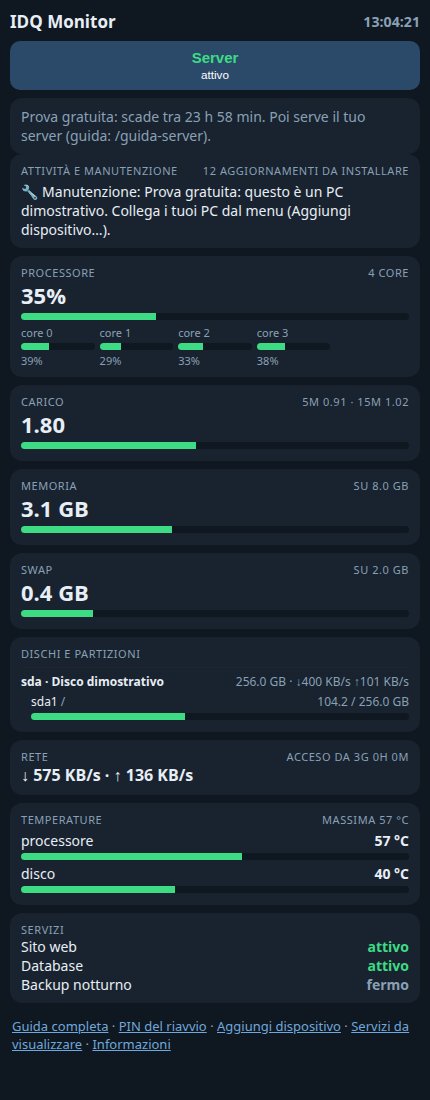
IDQ Monitor UserIDQ Monitor UserIDQ Monitor UserIDQ Monitor UserIDQ Monitor User
Versione web con il PC dimostrativo della prova gratuita; le app mostrano le stesse sezioni.Web version with the free trial's demo PC; the apps show the same sections.Version web avec le PC de démonstration de l'essai gratuit ; les applications affichent les mêmes sections.Webversion mit dem Demo-PC des kostenlosen Tests; die Apps zeigen dieselben Bereiche.Versión web con el PC de demostración de la prueba gratuita; las apps muestran las mismas secciones.

DownloadDownloadTéléchargementsDownloadsDescargas

Scegli il tuo sistema: il download parte subito.Choose your system: the download starts right away.Choisissez votre système : le téléchargement démarre tout de suite.Wähle dein System: Der Download startet sofort.Elige tu sistema: la descarga empieza enseguida. · VersioneVersionVersionVersionVersión 1.1

per Windowsfor Windowspour Windowsfür Windowspara Windows21.7 MBper Linux (Ubuntu, Debian)for Linux (Ubuntu, Debian)pour Linux (Ubuntu, Debian)für Linux (Ubuntu, Debian)para Linux (Ubuntu, Debian)43.8 MBper Raspberry Pifor Raspberry Pipour Raspberry Pifür Raspberry Pipara Raspberry PiPi 5, 4, 400, 3, 3+, Zero 2 W (sistema a 64 bit)Pi 5, 4, 400, 3, 3+, Zero 2 W (64-bit system)Pi 5, 4, 400, 3, 3+, Zero 2 W (système 64 bits)Pi 5, 4, 400, 3, 3+, Zero 2 W (64-Bit-System)Pi 5, 4, 400, 3, 3+, Zero 2 W (sistema de 64 bits)42.1 MBper Androidfor Androidpour Androidfür Androidpara Android88 KB
Note sull'installazioneInstallation notesNotes d'installationHinweise zur InstallationNotas de instalación

per Windowsfor Windowspour Windowsfür Windowspara Windows: Windows 10 o 11. Procedura guidata che installa anche l'agente, se vuoi. Windows può chiedere conferma (SmartScreen): scegli «Maggiori informazioni» e «Esegui comunque».Windows 10 or 11. A wizard that can also install the agent. Windows may ask for confirmation (SmartScreen): choose “More info” and “Run anyway”.Windows 10 ou 11. Assistant qui peut aussi installer l'agent. Windows peut demander une confirmation (SmartScreen) : choisissez « Informations complémentaires » puis « Exécuter quand même ».Windows 10 oder 11. Ein Assistent, der auf Wunsch auch den Agenten installiert. Windows fragt eventuell nach (SmartScreen): Wähle „Weitere Informationen“ und „Trotzdem ausführen“.Windows 10 u 11. Un asistente que también puede instalar el agente. Windows puede pedir confirmación (SmartScreen): elige «Más información» y «Ejecutar de todos modos».

per Linux (Ubuntu, Debian)for Linux (Ubuntu, Debian)pour Linux (Ubuntu, Debian)für Linux (Ubuntu, Debian)para Linux (Ubuntu, Debian): Installa con: sudo apt install ./nomefile.debInstall with: sudo apt install ./filename.debInstallez avec : sudo apt install ./nomfichier.debInstallieren mit: sudo apt install ./dateiname.debInstala con: sudo apt install ./archivo.deb

per Raspberry Pifor Raspberry Pipour Raspberry Pifür Raspberry Pipara Raspberry Pi: Con sistema a 64 bit: Pi 5, 4, 400, 3, 3+, Zero 2 W (controlla con uname -m: deve rispondere aarch64). Per Pi Zero, Pi 1 e Pi 2 con sistema a 32 bit usa il comando «Aggiungi dispositivo» dell'app.With a 64-bit system: Pi 5, 4, 400, 3, 3+, Zero 2 W (check with uname -m: it must answer aarch64). For Pi Zero, Pi 1 and Pi 2 with a 32-bit system use the app's “Add device” command.Avec un système 64 bits : Pi 5, 4, 400, 3, 3+, Zero 2 W (vérifiez avec uname -m : il doit répondre aarch64). Pour Pi Zero, Pi 1 et Pi 2 avec un système 32 bits, utilisez la commande « Ajouter un appareil » de l'application.Mit 64-Bit-System: Pi 5, 4, 400, 3, 3+, Zero 2 W (prüfe mit uname -m: Die Antwort muss aarch64 lauten). Für Pi Zero, Pi 1 und Pi 2 mit 32-Bit-System nutze den Befehl „Gerät hinzufügen“ der App.Con sistema de 64 bits: Pi 5, 4, 400, 3, 3+, Zero 2 W (comprueba con uname -m: debe responder aarch64). Para Pi Zero, Pi 1 y Pi 2 con sistema de 32 bits usa el comando «Añadir dispositivo» de la app.

Programma server (solo Linux e Raspberry Pi)Server program (Linux and Raspberry Pi only)Programme serveur (Linux et Raspberry Pi uniquement)Server-Programm (nur Linux und Raspberry Pi)Programa servidor (solo Linux y Raspberry Pi): Il programma del server funziona solo su Linux e Raspberry Pi (non su Windows). I computer Windows si possono comunque monitorare. Segui la guida passo passo.The server program runs on Linux and Raspberry Pi only (not on Windows). Windows computers can still be monitored. Follow the step-by-step guide.Le programme serveur fonctionne uniquement sous Linux et Raspberry Pi (pas sous Windows). Les ordinateurs Windows peuvent quand même être surveillés. Suivez le guide pas à pas.Das Server-Programm läuft nur unter Linux und Raspberry Pi (nicht unter Windows). Windows-Computer lassen sich trotzdem überwachen. Folge der Schritt-für-Schritt-Anleitung.El programa del servidor solo funciona en Linux y Raspberry Pi (no en Windows). Los ordenadores Windows sí se pueden monitorizar. Sigue la guía paso a paso.

Il tuo server, gratisYour own server, for freeVotre propre serveur, gratuitementDein eigener Server, kostenlosTu propio servidor, gratis

Ti basta un computer sempre acceso con Linux (anche un Raspberry Pi): circa 20 minuti e nessuna porta da aprire sul router.All you need is an always-on Linux computer (even a Raspberry Pi): about 20 minutes and no router ports to open.Il vous suffit d'un ordinateur Linux toujours allumé (même un Raspberry Pi) : environ 20 minutes et aucun port à ouvrir sur la box.Du brauchst nur einen ständig laufenden Linux-Computer (auch ein Raspberry Pi genügt): etwa 20 Minuten und keine Router-Ports zu öffnen.Solo necesitas un ordenador Linux siempre encendido (incluso una Raspberry Pi): unos 20 minutos y ningún puerto que abrir en el router.

Programma server (solo Linux e Raspberry Pi)Server program (Linux and Raspberry Pi only)Programme serveur (Linux et Raspberry Pi uniquement)Server-Programm (nur Linux und Raspberry Pi)Programa servidor (solo Linux y Raspberry Pi)Per avere il tuo server: da installare su un computer Linux o un Raspberry Pi sempre acceso, non su Windows (serve dopo la prova di 24 ore)To run your own server: install it on an always-on Linux computer or Raspberry Pi, not on Windows (needed after the 24-hour trial)Pour avoir votre serveur : à installer sur un ordinateur Linux ou un Raspberry Pi toujours allumé, pas sur Windows (nécessaire après l'essai de 24 h)Für deinen eigenen Server: auf einem ständig laufenden Linux-Computer oder Raspberry Pi installieren, nicht unter Windows (nötig nach dem 24-Stunden-Test)Para tener tu servidor: instálalo en un ordenador Linux o una Raspberry Pi siempre encendidos, no en Windows (hace falta tras la prueba de 24 horas)81 KBGuida completa al tuo serverComplete guide to your own serverGuide complète pour votre serveurKomplette Anleitung für deinen ServerGuía completa para tu servidorPasso passo, gratis: circa 20 minuti e nessuna porta da aprire sul routerStep by step, free: about 20 minutes and no router ports to openPas à pas, gratuit : environ 20 minutes et aucun port à ouvrir sur le routeurSchritt für Schritt, kostenlos: etwa 20 Minuten und kein Router-Port nötigPaso a paso, gratis: unos 20 minutos y sin abrir puertos en el router
Ti è utile? Sostieni il progettoDo you find it useful? Support the projectIl vous est utile ? Soutenez le projetNützlich für dich? Unterstütze das Projekt¿Te resulta útil? Apoya el proyecto

IDQ Monitor User è gratuito. Se vuoi, fai una donazione: poi il download parte da solo. Oppure continua senza donare.IDQ Monitor User is free. If you like, make a donation: the download then starts by itself. Or continue without donating.IDQ Monitor User est gratuit. Si vous le souhaitez, faites un don : le téléchargement démarre ensuite tout seul. Ou continuez sans donner.IDQ Monitor User ist kostenlos. Wenn du magst, spende: danach startet der Download von selbst. Oder fahre ohne Spende fort.IDQ Monitor User es gratuito. Si quieres, haz una donación: después la descarga empieza sola. O continúa sin donar.

Dona conDonate withDonner avecSpenden mitDonar con PayPal Revolut

Sostieni il progettoSupport the projectSoutenez le projetUnterstütze das ProjektApoya el proyecto

IDQ Monitor User è gratuito. Se ti è utile, puoi offrire un contributo volontario.IDQ Monitor User is free. If it's useful to you, you can make a voluntary contribution.IDQ Monitor User est gratuit. S'il vous est utile, vous pouvez faire une contribution volontaire.IDQ Monitor User ist kostenlos. Wenn es dir nützt, kannst du freiwillig etwas beitragen.IDQ Monitor User es gratuito. Si te resulta útil, puedes hacer una contribución voluntaria.

DonaDonateFaire un donSpendenDonar

PayPal Revolut

ContattiContactContactKontaktContacto

ParliamoneLet's talkDiscutons-enSprechen wirHablemos

Due domande veloci prima di scrivere: così il messaggio arriva già con tutto il contesto che serve per risponderti bene. Two quick questions before you write: that way the message arrives with all the context needed to answer you well. Deux questions rapides avant d'écrire : ainsi le message arrive avec tout le contexte nécessaire pour bien vous répondre. Zwei kurze Fragen, bevor Sie schreiben: So kommt die Nachricht gleich mit allem nötigen Kontext an. Dos preguntas rápidas antes de escribir: así el mensaje llega ya con todo el contexto necesario.